Table of Contents
Contents are generated from article headings.
A budget template is a pre-built financial planning framework with spending categories, allocation fields, and calculation formulas already in place — requiring only personal income and expense data as inputs. Budget templates eliminate the blank-page problem that causes most first-time budgeters to abandon the process before entering a single number.
Budget templates differ from budgeting methods: a template is the format (spreadsheet, app, printable), while the method is the philosophy (zero-based, 50/30/20, envelope). The same budgeting method can be executed through different template formats. Choosing a template based on visual design rather than its underlying budgeting method is one of the most common selection mistakes.
This content discusses budget template types and selection using financial planning principles. Template effectiveness varies based on income level, household composition, financial goals, and jurisdiction-specific costs. FinQuarry provides informational content only — this does not constitute personalized financial advice.
What a Budget Template Actually Does
A budget template provides pre-defined structure (categories organized by function) and calculation logic (income minus expenses equals surplus/deficit, with automatic subtotals and percentage calculations).
Why Structure Reduces Abandonment
Research on planning behavior consistently demonstrates that people complete tasks at significantly higher rates when the framework is provided rather than self-created. A budget template removes the most cognitively demanding step — designing the category structure — before any financial decision is required.
A person who opens a pre-built Google Sheets template with 12 labeled categories, working formulas, and a visual surplus/deficit number begins entering data within 2 minutes. A person creating the same budget from a blank sheet spends 30–45 minutes on category design, formula creation, and layout decisions before entering any financial data — and many stop before reaching that point.
Template vs. Budgeting Method
A 50/30/20 template has three category groups with percentage targets. A zero-based template has every category with the total designed to reach zero. An envelope template maps to physical or virtual cash containers. Understanding this distinction prevents choosing a template that looks good but executes a method that does not fit the user’s tracking tolerance.
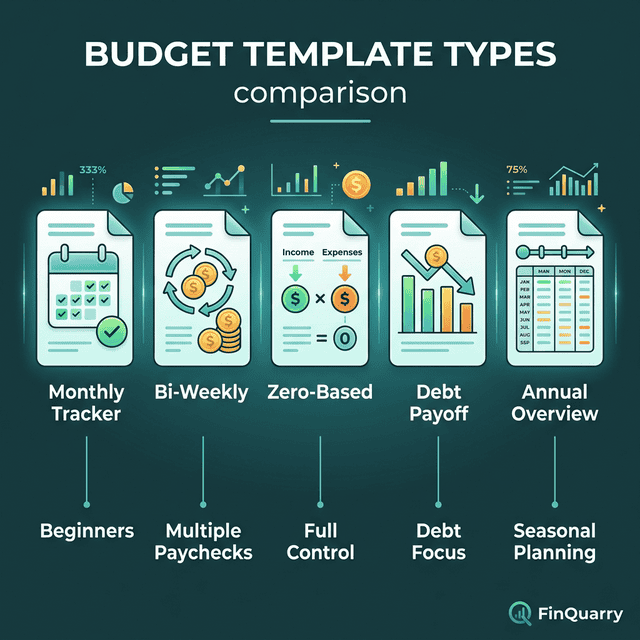
Five Budget Template Types
The Monthly Cash Flow Template
Tracks monthly income against monthly expenses across all categories. Structure: income sources at top, fixed expenses, variable expenses, savings/investments, and a bottom-line surplus or deficit calculation.
Best for salaried workers with predictable income who want a complete monthly overview. A person earning $4,500/month with 15 expense categories can set up this template in 30 minutes and maintain it with 10 minutes of weekly review.
The Bi-Weekly Paycheck Template
Allocates spending per pay period rather than per month. Designed for the 26-paycheck cycle (bi-weekly pay), this template captures the two “bonus paycheck” months per year for strategic allocation — typically $1,500–2,500 in extra income that monthly templates miss entirely.
Best for hourly workers, bi-weekly salaried workers, and people whose bills arrive at different times within the month.
The Zero-Based Template
Every line item reduces the available balance toward zero. Income minus all allocations equals $0. The template requires every dollar to be assigned. Best for people who want maximum control and are comfortable with detailed tracking — typically 20–30 minutes per week.
The Debt Payoff Template
Integrates debt balances, interest rates, minimum payments, and extra payment allocations into the budget structure. Includes payoff timeline calculators and interest-saved projections.
A person with $12,000 across three credit cards (18%, 22%, and 24.99% APR) can use this template to visualize that an extra $200/month toward the highest-rate card eliminates all three debts in 28 months — saving $4,200 in interest compared to minimum payments across all three simultaneously.
The Annual Overview Template
Twelve monthly columns showing income, expenses, savings, and net position across the full year. Reveals seasonal patterns invisible in monthly templates: holiday spending spikes, summer utility increases, annual insurance renewals, back-to-school costs.
Best for people who have maintained monthly budgets for 3+ months and want to plan for irregular expenses using an annual perspective.
How to Choose the Right Template
Match Template to Income Pattern
A monthly template assumes predictable monthly income. Variable-income workers (freelance, commission, gig) need bi-weekly or per-payment templates that allocate each deposit as it arrives rather than projecting a monthly total.
Match Template to Tracking Tolerance
A 40-category template produces maximum visibility and maximum tracking burden. A 7-category template produces sufficient visibility with minimal effort. If detailed tracking has caused budgeting burnout in the past, fewer categories produce better long-term outcomes through sustained use.
Match Template to Financial Goal
Someone building an emergency fund needs a template featuring savings targets and progress tracking. Someone eliminating debt needs balance tracking and payoff calculators. Someone stopping the paycheck-to-paycheck cycle needs a cash flow template showing available balance in real time.
Free vs. Paid Budget Templates
Free Templates That Work
Google Sheets and Microsoft Excel both offer free budget templates with pre-built formulas. The functional requirements — categories, formulas, surplus/deficit calculation — are straightforward enough that free templates handle them adequately for most users.
When Paid Templates Add Value
Paid templates ($5–$30) typically add visual design, pre-built dashboards with auto-updating charts, and method-specific structure (detailed zero-based layouts, debt snowball calculators, annual planning integrations). The additional cost benefits people motivated by visual presentation — not people who need fundamentally different functionality.
Can a Budget Template Replace a Budgeting App?
Templates are passive (structure provided, person inputs data). Budgeting apps are active (bank connection, auto-categorization, alerts). Templates require more manual effort but offer more customization and no subscription fees. Apps require less effort but offer less flexibility and typically charge $4–15/month.
For people who prefer manual control over budgeting without apps, a well-built template provides complete functionality without app dependency.
What If No Existing Template Fits?
Building a custom template from a blank spreadsheet is the correct approach when financial structure is complex — multiple income sources, irregular schedules, shared expenses, and layered debt. Start with three sections (income, expenses, savings), add sub-categories from actual spending data, and build formulas for totals and remaining balances.
Many people start with a pre-built template, use it for two months to discover what they actually need, then build a custom version using that experience as their design guide.
Written by Sarah Mitchell, Financial Content Strategist | Reviewed by Riley Thompson, Editor & Compliance Reviewer, FinQuarry