Table of Contents
Contents are generated from article headings.
A budgeting app is a software tool that aggregates financial account data, categorizes transactions, and visualizes spending patterns — automating the information-gathering layer of budgeting that manual methods require the person to perform themselves. Budgeting apps reduce the mechanical effort of budgeting by 60–80% but cannot perform the behavioral function that makes budgeting produce results: changing spending decisions.
Budgeting apps are information systems, not behavior-change systems. When used for financial diagnosis — understanding where money goes — they are effective tools. When expected to change spending habits through data alone, they consistently underperform because data visualization does not address the emotional, psychological, and habitual patterns that drive spending decisions.
This content discusses budgeting app functionality and limitations using financial planning principles, behavioral research, and consumer technology analysis. App features, pricing, and availability change frequently. FinQuarry provides informational content only — this does not constitute personalized financial advice.
What Budgeting Apps Actually Do
Budgeting apps perform three core functions: aggregation (pulling financial data from multiple accounts into one view), categorization (sorting transactions into spending groups), and visualization (displaying patterns through charts and summaries).
Automatic Transaction Categorization
Most budgeting apps connect to bank accounts and credit cards via financial data aggregators (Plaid, Yodlee, MX) and sort transactions automatically. A $47.82 charge at a grocery store becomes “Groceries.” A $12.99 Netflix charge becomes “Subscriptions.”
This automation eliminates the most tedious component of manual budgeting — transaction entry — but introduces categorization errors. Most apps achieve 75–85% accuracy on auto-categorization, meaning 15–25% of a typical household’s 120–150 monthly transactions require manual correction.
Spending Visualization
Apps transform raw transaction data into visual patterns: pie charts showing category distribution, bar charts comparing month-over-month spending, trend lines tracking spending trajectories. Research on financial decision-making indicates that visual representation of spending data improves financial awareness more effectively than numerical tables.
Seeing that dining consumed 22% of a $3,400 paycheck creates a qualitatively different cognitive impression than reading “$748 in restaurant charges” — the percentage reveals proportionality that raw numbers obscure.
Budget Alerts
Apps send alerts when a spending category approaches or exceeds its budget. Alert fatigue is a documented problem: users receiving more than 3–5 alerts per week tend to disable notifications entirely, converting the alert system from useful feedback into ignored noise.
Three Categories of Budgeting Apps
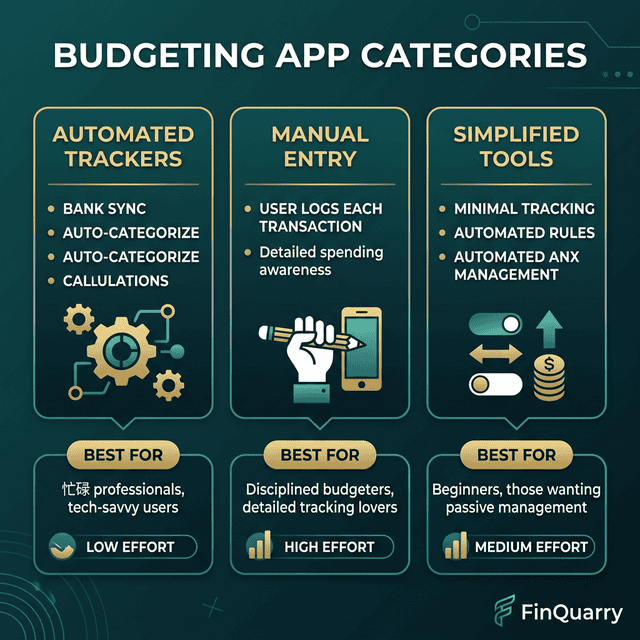
Manual Input Apps
Apps like YNAB (You Need A Budget) require users to manually enter or confirm each transaction. The design philosophy is intentional friction: manually recording a $47 grocery purchase creates a cognitive checkpoint that automatic tracking bypasses.
Users of manual-input apps report 15–20% reduction in discretionary spending. However, the method requires 5–10 minutes daily, making it the highest-effort app category.
Automatic Tracking Apps
Apps that connect to accounts and auto-categorize with minimal input shift the user’s role from data entry to periodic data review — checking categories monthly, adjusting budgets, and reviewing summaries.
The primary limitation is passive awareness. Auto-tracking creates financial knowledge without the behavioral friction that produces spending changes. A person who sees they spent $380 on dining has information. Whether they change the pattern depends on factors the app does not influence.
Goal-Focused Apps
These apps organize budgeting around specific financial targets — save $5,000 for a vacation, pay off $8,000 in credit card debt — rather than spending categories. Budget structure centers on goal progress rather than category compliance.
Goal visualization creates stronger behavioral commitment than category tracking for many users. The limitation: focusing on one goal may neglect overall financial health.
The Two-Week Cliff: Why Most People Stop
App engagement data consistently shows a steep usage drop-off between days 10 and 21. The pattern: initial enthusiasm (daily checking) → familiarity (routine checking) → diminishing novelty (app shows same patterns) → abandonment.
The Awareness Plateau
After two weeks, users learn their spending contour — dining is high, subscriptions add up, entertainment exceeds estimates. This information is valuable the first time. By week three, the app produces the same patterns with minor variations.
The person has reached an awareness plateau. The app has delivered its diagnostic value and has nothing new to offer, which is precisely when engagement collapses.
The Missing Behavioral Layer
A person who spends emotionally does not stop because an app categorized the purchase. A person who overspends on dining because social meals carry psychological importance does not reduce that spending because a pie chart shows it at 22% of income. The gap between financial information and behavioral change is where apps structurally fail — not from poor design, but because behavior change requires a different intervention than data visualization.
How to Use Budgeting Apps Effectively
Use for Diagnosis, Not Treatment
The most effective approach: commit to 30–60 days of comprehensive tracking as a diagnostic period. Use the resulting spending data to build a sustainable budget. Then decide whether ongoing app use adds value or whether the diagnostic phase provided sufficient information for manual budgeting.
Reduce Notification Frequency
Configure one weekly summary instead of real-time alerts. A single weekly message — “You spent $312 on dining this week, $188 remaining” — provides adequate awareness without producing the alert fatigue that accelerates abandonment.
Pair the App With a Method
An app without a budgeting method is a tracking tool without a framework. The app should execute a chosen method: zero-based budgeting (every dollar assigned), 50/30/20 (percentage allocation), or pay-yourself-first (automated savings, tracked spending). The method provides structure. The app provides execution.
Do I Need a Paid App?
Free apps provide automatic transaction import, basic categorization, and spending summaries. Paid apps ($4–15/month) add goal tracking, debt payoff calculators, investment integration, and methodology-specific features like YNAB’s zero-based approach.
The decision question is not “which app is best?” but “will I use this app consistently for longer than 30 days?” An imperfect free app used for six months produces vastly better outcomes than a sophisticated paid app abandoned after two weeks.
Are Budgeting Apps Safe for Bank Connection?
Major budgeting apps use bank-level encryption (256-bit AES) and connect through regulated data aggregators. The connection is read-only — apps view transaction data but cannot initiate transfers. Security risk is comparable to online banking itself. The primary privacy concern is not unauthorized access but data sharing — review privacy policies to understand what financial data is shared with third parties.
Written by Sarah Mitchell, Financial Content Strategist | Reviewed by Riley Thompson, Editor & Compliance Reviewer, FinQuarry