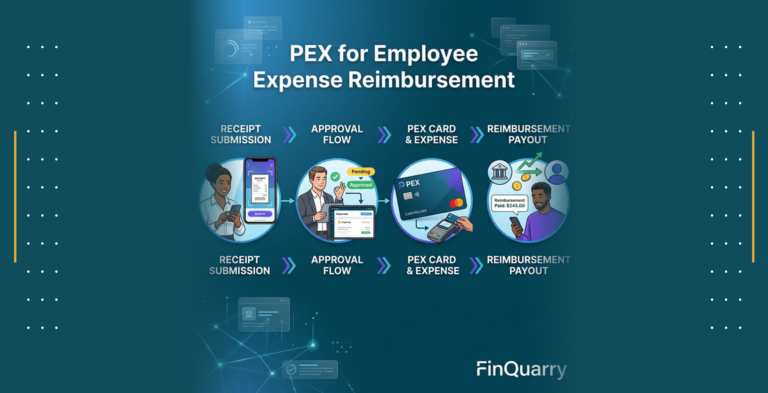
Table of Contents
Contents are generated from article headings.
Evaluating PEX for mobile expense reporting requires testing the platform’s card-first workflow model against your organization’s spend patterns, accounting integration requirements, policy enforcement needs, and mobile adoption constraints. The evaluation centers on whether PEX’s point-of-spend controls, receipt capture workflow, mobile approval routing, and accounting sync reliability align with your finance operations rather than general expense management capabilities.
This evaluation framework helps CFOs, finance directors, and accounting operations leaders determine whether PEX’s mobile reporting features fit their organizational requirements. The framework focuses on measurable outcomes including submission cycle time, receipt compliance rate, coding accuracy, reconciliation efficiency, and policy violation reduction rather than feature checklists or vendor marketing claims.
You will gain a structured evaluation scorecard with weighted criteria, a testable demo script for validating integration claims, a 30-day pilot design template, mobile-specific failure scenarios to investigate, and ROI calculation inputs based on measurable process improvements. The framework distinguishes between fit indicators and disqualifiers to accelerate purchase decisions while reducing implementation risk.
Jurisdiction and Temporal Scope: This evaluation framework applies general principles for assessing mobile expense reporting platforms as of 2026. Regulatory requirements, accounting standards, compliance obligations, platform capabilities, and vendor policies vary by country, industry, and organizational context, and change over time. Organizations should verify jurisdiction-specific requirements and confirm current specifications directly with PEX during evaluation.
What Mobile Expense Reporting Means and What You Should Measure
Mobile expense reporting encompasses the end-to-end workflow of capturing transaction receipts, creating expense entries, obtaining approvals, assigning accounting codes, and syncing data to ERP systems through mobile applications rather than desktop interfaces. This workflow differs from general expense management by prioritizing real-time capture, offline functionality during travel, push notification-driven compliance, and touch-optimized user interfaces designed for field and remote employees.
Mobile Expense Reporting vs Expense Management
Mobile expense reporting represents a specific workflow subset within broader expense management operations. Expense management includes accounts payable automation for vendor invoices, procurement card programs, travel booking integration, and enterprise-wide spend analytics. Mobile expense reporting specifically addresses employee-initiated transactions captured through mobile devices with photo-based receipt documentation and mobile approval chains.
The distinction matters for evaluation because platforms optimized for mobile reporting prioritize real-time transaction feeds, camera-based receipt capture, offline storage and sync capabilities, and mobile-native approval workflows. Platforms designed for comprehensive expense management may treat mobile access as a secondary interface to desktop-first workflows, resulting in feature gaps or user experience friction on mobile devices.
Organizations evaluating PEX should clarify whether they need card-based spend control with mobile receipt attachment or reimbursement-based expense report creation on mobile. PEX’s architecture centers on prepaid corporate cards with real-time transaction feeds, making it strongest for card-first workflows where employees capture receipts for card transactions rather than submitting out-of-pocket reimbursement requests.
The Mobile Workflow: Capture, Submit, Approve, Code, Sync
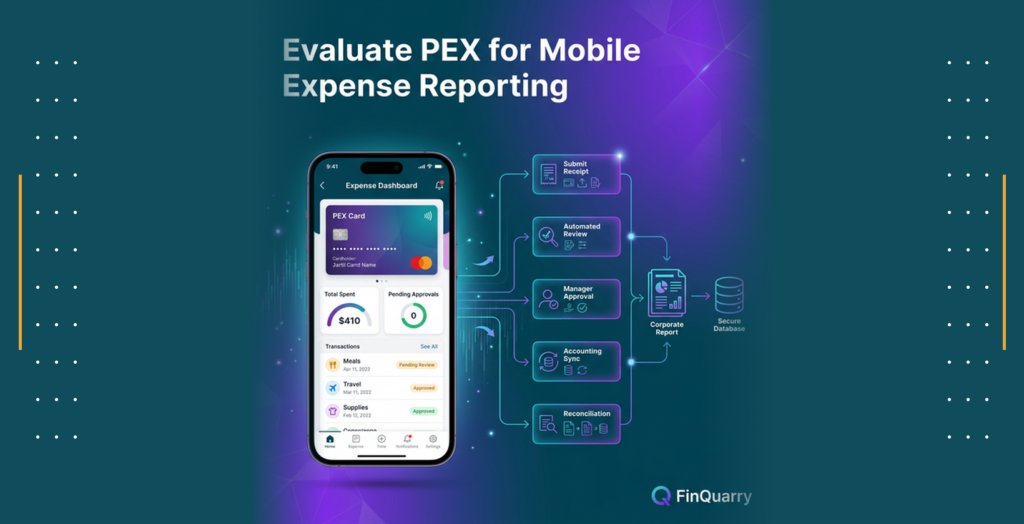
The mobile expense reporting workflow consists of five sequential stages that determine platform effectiveness and user adoption rates. Receipt capture occurs when employees photograph receipts immediately after purchase, with the mobile app validating image quality, extracting merchant and amount data through optical character recognition, and prompting for required fields like expense category and business purpose.
Expense submission happens when employees complete mandatory fields, attach receipt images to corresponding card transactions or create new expense entries, and submit for approval through the mobile interface. Submission triggers notification workflows that route expense items to designated approvers based on amount thresholds, department hierarchies, or project assignments configured in the system.
Mobile approval enables managers to review expense details, examine receipt images, verify policy compliance, and approve or reject submissions directly from mobile devices without requiring desktop access. Approval actions generate timestamps and audit log entries that track approver identity, decision timing, and any comments or modification requests.
Accounting code assignment involves mapping expenses to general ledger accounts, cost centers, departments, projects, or classes either through automated rules based on merchant category, manual selection by employees during submission, or batch coding by finance teams after approval. Mobile interfaces that support GL code selection during submission tend to improve coding accuracy by capturing employee context while transaction details remain fresh.
ERP sync represents the final stage where approved and coded expenses transfer to accounting systems as journal entries, typically through API connections or file-based integration. Sync reliability determines whether expenses post accurately to the correct accounts without duplicates, missing entries, or data transformation errors that require manual reconciliation.
What Good Mobile Reporting Looks Like
Effective mobile expense reporting produces measurable improvements in submission speed, data completeness, coding accuracy, and policy compliance compared to manual or desktop-based processes. Submission latency, measured as the time between transaction occurrence and expense submission, typically decreases from days or weeks to hours when employees can capture receipts immediately on mobile devices rather than accumulating paper receipts for later data entry.
Receipt compliance rate, calculated as the percentage of card transactions with attached receipt documentation, generally improves when mobile apps send push notifications for missing receipts and allow instant photo capture versus requiring employees to scan or upload receipts from computers. Organizations with strong mobile adoption often achieve 85-95% receipt compliance compared to 60-75% with desktop-only systems.
Coding accuracy, measured by the percentage of expenses correctly assigned to appropriate GL accounts and cost centers on first submission, tends to increase when employees select codes during mobile submission while transaction context is clear rather than relying on finance teams to interpret transaction descriptions weeks later. Automated merchant category mapping can further improve accuracy by pre-filling likely GL codes based on vendor type.
Policy violation rates decrease when systems enforce spending limits, merchant restrictions, and approval requirements at the point of transaction or submission rather than during post-hoc review. Mobile platforms that block non-compliant transactions before they occur or flag policy violations during submission prevent exceptions that require manual investigation and correction.
Where Mobile Reporting Fails
Common mobile expense reporting failures include missing receipt submissions despite photo capture capabilities, delayed expense entry despite mobile access, incorrect coding despite dropdown menus, and unresolved policy violations despite automated flags. These failures typically stem from user experience friction, inadequate policy configuration, weak integration reliability, or insufficient adoption support rather than core platform limitations.
Missing receipts occur when employees capture photos but fail to attach them to specific transactions, when image quality issues prevent automatic transaction matching, when offline-captured receipts fail to sync upon reconnection, or when duplicate detection systems incorrectly reject valid receipts. Organizations should test how platforms handle these scenarios during evaluation rather than assuming photo capture alone ensures compliance.
Submission delays persist when mobile workflows require excessive data entry, when approval routing sends expenses to incorrect or unavailable approvers, when employees lack clarity on expense policies and defer submission to avoid rejection, or when platform performance issues discourage mobile usage. Evaluators should measure actual submission latency during pilots rather than relying on vendor demonstrations with ideal conditions.
Coding errors continue when automated merchant categorization assigns incorrect GL codes, when employees lack sufficient accounting knowledge to select appropriate codes from extensive lists, when cost center and project hierarchies prove too complex for mobile interfaces, or when integration mappings translate codes incorrectly between expense platforms and ERP systems. Testing should validate coding accuracy through actual accounting reconciliation rather than trusting interface displays.
Policy violations remain unresolved when automated flags lack clear remediation workflows, when approvers lack sufficient context to make informed decisions on mobile devices, when escalation paths prove unclear or unresponsive, or when finance teams lack tools to track violation resolution systematically. Evaluation should examine how platforms guide users from violation detection through resolution rather than simply flagging issues.
How PEX Handles Mobile Expense Reporting
PEX operates as a card-first expense control platform where mobile reporting serves primarily to attach receipts and documentation to existing card transactions rather than to create reimbursement-based expense reports. This architectural approach aligns best with organizations seeking to reduce employee out-of-pocket spending, enforce spending policies at point of purchase, and eliminate reimbursement cycles through prepaid corporate cards.
Card First vs Reimbursement First Workflows
Card-first expense workflows begin with prepaid card transactions that generate real-time transaction feeds in the expense management system. Employees receive spending notifications immediately after card usage and capture receipt photos to document transactions that already appear in the system. The mobile workflow focuses on receipt attachment, expense categorization, and business purpose documentation rather than amount entry or approval request initiation.
Reimbursement-first workflows require employees to pay business expenses from personal funds, create expense entries manually by entering merchant names and transaction amounts, attach receipt documentation, and submit for approval and reimbursement. The mobile workflow encompasses the complete expense creation process including amount entry, merchant identification, category selection, and reimbursement request submission.
PEX’s card-centric model eliminates reimbursement creation and payment processing from the mobile workflow, simplifying the employee experience to receipt capture and transaction documentation. This model fits organizations where most business expenses can occur through corporate cards including travel, meals, office supplies, and subscription services. Organizations with significant out-of-pocket expenses like client entertainment, remote vendor payments, or contractor reimbursements may require supplemental reimbursement capabilities beyond PEX’s core card platform.
The distinction affects mobile evaluation because card-first platforms measure success through receipt compliance, documentation quality, and transaction categorization accuracy rather than reimbursement cycle time or submission completeness. Organizations should clarify their spend profile before evaluating PEX to ensure the platform’s architecture matches their operational requirements.
Receipt Capture Experience
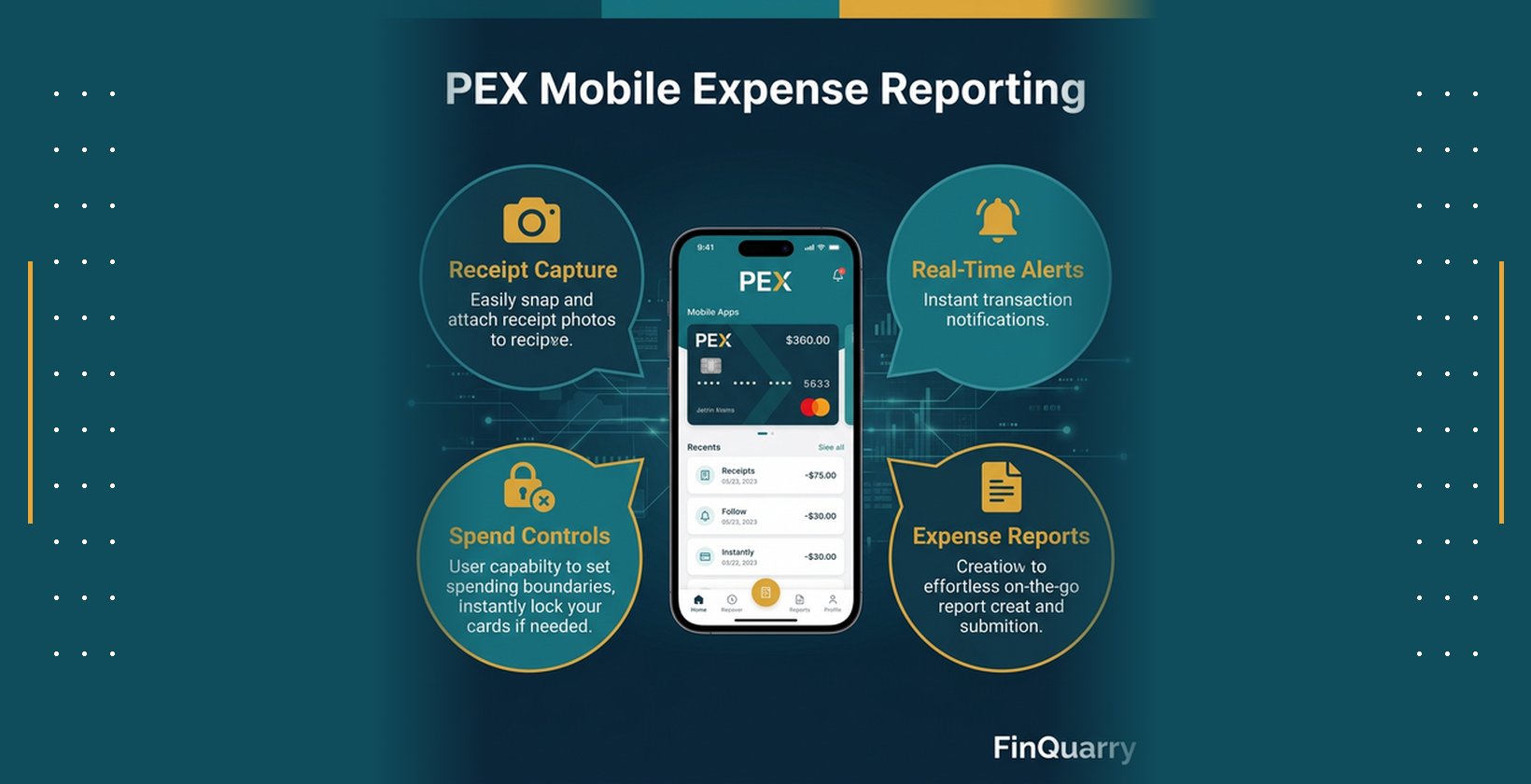
PEX’s mobile receipt capture relies on device camera integration that allows employees to photograph receipts directly within the mobile app. The capture interface provides visual guides for receipt positioning, automatic edge detection to crop images, and basic image quality checks for blur and lighting issues. Captured images store locally on the device if offline and sync to PEX servers when connectivity restores.
The platform attempts to extract merchant name, transaction date, and total amount from receipt images through optical character recognition, pre-filling these fields when extraction confidence meets threshold requirements. Employees review extracted data for accuracy and manually correct errors or complete missing fields before attaching receipts to specific card transactions. The matching process typically occurs automatically when transaction amounts and dates align closely, though employees can manually match receipts to transactions when automatic matching fails.
Required receipt fields vary based on organizational policy configuration but commonly include expense category, business purpose or memo, and confirmation that the transaction occurred for legitimate business purposes. Some organizations configure additional required fields like client codes, project identifiers, or billable status depending on their accounting and reporting needs.
Mobile receipt capture effectiveness depends on image quality, OCR accuracy rates, transaction matching reliability, and the clarity of required field prompts. Evaluators should test capture workflows with actual receipts including thermal receipts that fade quickly, crumpled receipts from wallets or pockets, multi-page receipts from itemized restaurant bills, and foreign language receipts from international travel to assess real-world performance rather than pristine demonstration receipts.
Policy Enforcement In App
PEX enforces spending policies primarily through card-level controls configured by administrators rather than through mobile submission validation. Card spending limits restrict maximum transaction amounts or daily spending totals, preventing employees from initiating purchases that exceed authorized thresholds. Merchant category controls allow or block transactions at specific vendor types, preventing card usage at establishments that violate company policies like bars, casinos, or personal shopping retailers.
Individual transaction approval requirements can mandate manager authorization before specific card purchases complete, though this capability operates at the card network level rather than through mobile app workflows. Organizations seeking approval-based controls should clarify whether PEX’s approval mechanisms meet their workflow requirements during evaluation, as card-level blocks differ from expense report approval chains common in reimbursement-based systems.
The mobile app displays policy limits, allowed merchant categories, and approval requirements when employees attempt transactions, helping prevent policy violations before they occur. Post-transaction policy enforcement occurs when employees submit receipts and categorize expenses, with the system flagging potential violations based on expense category, amount thresholds, or merchant type for manager review.
Mobile policy visibility helps employees understand spending constraints and make compliant purchasing decisions, though the effectiveness depends on policy configuration clarity, employee training on policy interpretation, and manager responsiveness to exception requests. Evaluation should test whether policy displays provide sufficient guidance for employee decision-making in realistic purchasing scenarios.
Manager Approvals on Mobile
Manager approval workflows in PEX allow designated approvers to review submitted receipts, verify expense categorization, confirm business purpose justification, and approve or reject documentation through the mobile interface. Approval notifications arrive via push alerts when employees submit receipts requiring approval, enabling managers to address approval queues without monitoring email or logging into desktop systems.
The mobile approval interface displays receipt images, transaction details including merchant and amount, employee-provided categorization and business purpose, and any policy flag annotations generated by the system. Managers can approve items individually, approve multiple items in batch, reject items with explanatory comments, or request additional information from employees before making decisions.
Approval delegation allows managers to assign backup approvers during travel or unavailability, preventing approval bottlenecks that delay expense processing. Escalation workflows route expenses to higher-level approvers when amounts exceed manager authorization limits or when specific expense categories require additional oversight.
Mobile approval effectiveness depends on notification reliability, interface clarity for rapid decision-making, and the completeness of displayed information for informed approvals. Evaluators should test approval workflows during pilots by measuring approval cycle time, examining rejected expense patterns to identify unclear policy areas, and gathering manager feedback on mobile interface usability compared to desktop approval tools.
Offline and Travel Behavior
PEX’s mobile app supports offline receipt capture, storing photos and expense data locally on devices when network connectivity proves unavailable during travel, in areas with poor cellular coverage, or while on aircraft. Offline functionality allows employees to document expenses immediately rather than delaying capture until connectivity restores, reducing the risk of lost receipts or forgotten transaction details.
Captured receipts and expense data queue for synchronization when the device reconnects to networks, with the app attempting automatic sync in the background or prompting manual sync initiation by users. Sync conflict handling becomes relevant when employees capture the same transaction offline on multiple devices or when transaction data changes on the server between offline capture and sync completion.
International travel introduces additional complexity including currency conversion for foreign transactions, time zone handling for transaction timestamps, and mobile data usage concerns that may lead employees to disable automatic sync. Organizations with significant international travel should test offline behavior with actual international receipts, verify currency conversion accuracy against accounting requirements, and confirm that sync delays do not create accounting period cutoff issues.
The offline capabilities affect mobile adoption among frequent travelers and field employees who work in locations with unreliable connectivity. Evaluation should test offline capture and sync reliability rather than assuming advertised offline support performs adequately in real-world travel conditions.
Evaluation Scorecard: How to Test PEX Mobile Reporting in Real Life
Structured evaluation requires weighted criteria that reflect organizational priorities, testable validation methods that verify vendor claims, controlled pilot deployments that measure actual outcomes, and clear disqualification triggers that prevent costly implementation failures. The scorecard approach replaces subjective vendor presentations with objective measurements tied to business requirements.
The Six Criteria Scorecard
Receipt capture speed measures the time and effort required for employees to photograph receipts, verify extracted data, complete required fields, and attach documentation to transactions. Organizations should test actual capture workflows during demonstrations by timing how long employees need to process various receipt types including clear machine-printed receipts, handwritten receipts, thermal receipts, and multi-page itemized receipts. Acceptable performance typically requires receipt capture completion in under 60 seconds for standard receipts.
Integration reliability encompasses the accuracy and consistency of data flow between PEX and accounting systems including general ledger posting, cost center assignment, project code mapping, and transaction detail transfer. Testing requires submitting test expenses through the complete workflow and verifying that resulting journal entries in the accounting system match expected amounts, accounts, and dimensions without manual corrections. Integration reliability below 95% accuracy typically requires additional configuration or indicates fundamental compatibility issues.
Policy control effectiveness evaluates whether the platform prevents, detects, or enables resolution of policy violations including spending limit breaches, unauthorized merchant categories, missing receipt documentation, and out-of-policy expense categories. Testing involves intentionally attempting policy violations during demonstrations and pilots to verify that controls function as configured rather than trusting vendor assurances. Effective policy controls should prevent or flag violations with clear remediation workflows.
Approval workflow performance measures the cycle time from expense submission to approval completion, the accuracy of approval routing to correct managers, the usability of mobile approval interfaces, and the handling of delegation and escalation scenarios. Pilots should track actual approval cycle times, identify approval bottlenecks through workflow analytics, and gather manager feedback on notification effectiveness and approval decision confidence.
Audit trail completeness verifies that the system captures and retains necessary documentation for compliance including receipt images, approver identities, approval timestamps, expense modifications, policy override justifications, and accounting code changes. Testing requires reviewing actual audit logs from pilot expenses and confirming that trails meet organizational and regulatory requirements for financial documentation retention and traceability.
Total cost of ownership includes not only platform licensing fees but also integration development costs, ongoing support and training expenses, process redesign efforts, and productivity impacts during transition. ROI calculation requires comparing current-state costs including manual processing time, policy violation losses, missing receipt write-offs, and delayed close cycles against projected improvements with realistic adoption rates and efficiency gains.
Demo Script: Show Me a Transaction End to End on Mobile
Effective demonstrations move beyond feature tours to actual workflow execution with realistic scenarios that reveal integration gaps, usability friction, and configuration complexity. The demo script should require vendors to demonstrate complete workflows using test data that mirrors your organization’s expense patterns, accounting structure, and approval hierarchies.
Request a demonstration of card transaction initiation, receipt capture within the mobile app, automatic transaction matching, required field completion, submission for approval, mobile approval by a manager, accounting code assignment, and sync to a test accounting environment. The end-to-end flow should complete during the demonstration without switching between systems, referencing documentation, or deferring technical questions to follow-up sessions.
Test offline receipt capture by disabling the demonstration device’s network connectivity, capturing a test receipt, and then re-enabling connectivity to verify sync behavior. This test reveals whether offline functionality operates reliably or represents a theoretical capability with practical limitations. Vendors should demonstrate conflict resolution when offline-captured data differs from server-state data.
Examine integration configuration by requesting vendors to show actual integration mapping screens, error logs from recent sync operations, and handling of common integration failures like rejected journal entries, duplicate detection, and partial sync completion. This examination exposes whether integration operates through robust API connections with comprehensive error handling or relies on fragile file transfers requiring frequent manual intervention.
Verify policy enforcement by attempting to submit expenses that violate configured policies including amount limit violations, unauthorized merchant categories, missing required fields, and duplicate receipt submissions. Vendors should demonstrate how the system prevents, flags, or enables resolution of each violation type rather than claiming policy controls exist without proving functionality.
Pilot Design: One Team, 30 Days, Defined Success Metrics
Controlled pilots deploy PEX mobile reporting to a single department or team with representative expense patterns, measure outcomes against baseline metrics, and identify implementation issues before organization-wide rollout. The pilot scope should include sufficient transaction volume to test system performance while limiting risk exposure if the platform proves unsuitable.
Pilot duration of 30 days provides enough time for employees to complete typical expense cycles, encounter realistic exception scenarios, and develop informed opinions about platform usability without extending evaluation timelines excessively. Organizations with longer expense cycles may need 45-60 day pilots to capture complete submission and approval workflows.
Success metrics should include measurable improvements in submission latency comparing days between transaction occurrence and receipt submission before and during the pilot, receipt compliance rate measuring the percentage of card transactions with attached documentation, coding accuracy tracking GL code correction rates during accounting reconciliation, and approval cycle time monitoring days between submission and approval completion.
Pilot participants should represent diverse roles including frequent travelers who test offline functionality, remote employees who rely entirely on mobile access, managers who test mobile approval workflows, and finance team members who validate accounting integration and reconciliation accuracy. Participant feedback provides qualitative insights on user experience, training effectiveness, and process improvement opportunities.
Disqualifiers: What Fails the Evaluation Immediately
Certain deficiencies during evaluation indicate fundamental platform limitations or vendor reliability issues that warrant immediate disqualification rather than attempting remediation through configuration or customization. Inability to demonstrate claimed integration capabilities during live demonstrations, particularly when vendors defer integration validation to post-purchase implementation, suggests that integration complexity or limitations exceed vendor marketing representations.
Missing or expired security certifications including SOC 2 Type II reports, PCI DSS compliance attestations where applicable, or relevant industry-specific certifications indicates insufficient security posture for financial data handling. Organizations should require current certification documentation during evaluation rather than accepting vendor claims without verification.
Lack of audit trail capabilities including immutable logs of approvals, expense modifications, policy overrides, or accounting code changes creates compliance risk for organizations subject to financial auditing, regulatory oversight, or internal control requirements. Vendors should demonstrate actual audit log content during demonstrations rather than describing theoretical audit capabilities.
Unacceptable integration failure rates discovered during technical due diligence, including documented customer complaints about sync reliability, frequent support tickets related to integration issues, or vendor acknowledgment of known integration limitations, suggest ongoing operational challenges that may not resolve through configuration alone.
Unrealistic vendor responses to configuration questions, including claims that all requested features exist without demonstrating functionality, promises that integration issues will resolve post-purchase without technical validation, or inability to provide reference customers with similar requirements and integration environments, indicate vendor overselling or platform limitations that may only become apparent after contractual commitment.
Accounting and ERP Integration: The Make or Break Test
Integration reliability determines whether mobile expense reporting delivers promised efficiency gains or creates additional reconciliation work when data transfers incorrectly between systems. Successful integration requires accurate GL account mapping, complete transaction detail transfer, reliable sync timing, and comprehensive error handling rather than simple data connectivity.
What Integration Must Include
GL account mapping translates expense categories selected in PEX to specific general ledger accounts in the accounting system, ensuring that expenses post to appropriate income statement or balance sheet accounts. Mapping complexity varies based on chart of account structure, with simple organizations requiring one-to-one category-to-account mappings while complex organizations may need multi-dimensional mapping incorporating departments, locations, projects, or cost centers.
Cost center assignment allows expenses to allocate across organizational units for departmental budget tracking, profitability analysis by business unit, or project-based cost accumulation. Integration must transfer cost center selections from PEX mobile submissions to corresponding dimensions in the accounting system without manual re-entry or translation. Organizations using multi-level cost hierarchies should verify that integration supports their full dimensional structure.
Project or class tagging enables job costing, client billing, grant accounting, or other specialized tracking requirements by associating expenses with specific projects, clients, grants, or internal initiatives. Mobile interfaces should allow employees to select relevant projects during expense submission when they understand transaction context rather than requiring finance teams to interpret and assign projects later. Integration must preserve project associations through the sync process.
Transaction detail transfer includes merchant names, transaction dates, receipt images or attachments, business purpose memos, approver identities, and approval timestamps that provide context for accounting records and support audit requirements. Insufficient detail transfer creates information gaps that complicate variance analysis, audit responses, and financial reporting.
Sync Failure Modes
Duplicate journal entries occur when sync processes post the same expense multiple times due to retry logic after initial failures, lack of idempotency in integration design, or concurrent sync operations from multiple sources. Organizations should test how platforms prevent or detect duplicates and whether reversal or correction processes exist when duplicates occur despite prevention attempts.
Partial sync completion happens when some expenses transfer successfully while others fail due to validation errors, missing required fields, or system-specific data constraints. Platforms should provide clear visibility into sync status, identify which expenses failed transfer with specific error messages, and enable targeted retry of failed items without reprocessing successful transfers.
Rejected journal entries result when accounting systems validate posted data against business rules and reject entries that violate constraints like invalid account codes, unbalanced debits and credits, closed accounting periods, or missing required dimensions. Integration should surface rejection details in user interfaces rather than silently failing, and provide workflows for correcting source data and retrying failed posts.
Coding drift occurs when expense categories or GL mappings change in PEX without corresponding updates in accounting systems, or when accounting system changes like account restructuring or department consolidations break existing mappings. Organizations should clarify whether integration supports mapping version control, provides alerts when mappings become invalid, and enables testing of mapping changes before production deployment.
User edits in either system after initial sync create inconsistencies when one system permits expense modifications that don’t propagate to connected systems. Organizations should clarify whether integration supports bi-directional sync, enforces edit restrictions after initial transfer, or provides mechanisms for detecting and resolving discrepancies between systems.
Reconciliation Workflow
Month-end close acceleration depends on expense data availability, completeness, and accuracy within accounting systems when finance teams begin closing processes. Organizations should test whether integration timing supports close schedules by confirming that approved expenses sync within acceptable timeframes, that cutoff handling prevents late submissions from posting to closed periods, and that reconciliation reports provide sufficient detail for variance investigation.
Approvals versus posting timing affects when expenses appear in financial statements relative to approval dates. Some organizations require expenses to post to accounting periods based on transaction dates regardless of approval timing, while others post to periods when approval occurs. Integration configuration should align with organizational policies for period assignment and provide controls that prevent posting to inappropriate periods.
Adjustment handling becomes necessary when errors require expense corrections, approvals reverse previous decisions, or accounting reclassifications prove necessary after initial posting. Organizations should verify that platforms support adjustment workflows including expense reversals, corrected resubmissions, and accounting journal entries that maintain audit trail connections between original and corrected transactions.
Reconciliation between card statements, expense documentation, and accounting entries ensures that all transactions receive appropriate treatment and that no expenses go unrecorded or duplicated. Integration should facilitate reconciliation by providing matching reports that compare card transaction feeds, submitted expenses, and accounting posts with clear identification of variances requiring investigation.
Audit Trail Integrity
Immutable logs record the sequence of events, decisions, and modifications associated with each expense to support compliance requirements, fraud investigations, and financial auditing. Audit trails should capture receipt image uploads with timestamps, expense submissions with requester identity, approval actions with approver identity and decision time, accounting code assignments with assignment source, and any subsequent modifications with change justification.
Approver identity verification ensures that audit logs record actual individuals who approved expenses rather than generic approval queue names or system accounts. Organizations subject to Sarbanes-Oxley or similar controls should verify that platforms capture and retain sufficient approver detail to demonstrate segregation of duties and appropriate authorization hierarchies.
Timestamp accuracy matters for demonstrating that approvals occurred before payment processing, that expenses posted to correct accounting periods based on transaction timing, and that policy changes applied appropriately based on effective dates. Organizations should verify that platforms use consistent time references, handle time zone differences correctly for distributed operations, and prevent timestamp manipulation.
Attachment retention policies determine how long platforms store receipt images, supporting documentation, and historical audit logs beyond active expense processing periods. Organizations should clarify retention capabilities, verify that retention periods meet regulatory and internal requirements, and understand whether retention requires additional cost or storage configuration.
Security, Compliance, and Risk Controls for Mobile Expense Reporting
Mobile expense reporting introduces specific security considerations related to device access, data storage on potentially lost or stolen devices, authentication mechanisms, and network transmission of financial information. Evaluation must address both platform security architecture and organizational controls for mobile device management.
Security Basics
Encryption protects financial data during transmission between mobile devices and PEX servers through TLS/SSL protocols and during storage on mobile devices through local encryption of cached receipt images and expense data. Organizations should verify that platforms enforce strong encryption standards, prohibit unencrypted data transmission, and encrypt locally stored data even on devices without full-disk encryption enabled.
Role-based access control limits platform functionality based on user roles including employee expense submission, manager approval, administrator configuration, and finance team reconciliation and reporting. Organizations should verify that platforms support granular permission configuration, allow creation of custom roles matching organizational hierarchies, and provide audit visibility into permission assignments and modifications.
Multi-factor authentication and single sign-on integration reduce credential theft risk while simplifying user access through organizational identity management systems. Platforms should support modern authentication protocols including SAML, OAuth, or OpenID Connect for SSO integration and provide MFA options for users accessing systems outside SSO frameworks.
Session management controls including idle timeout settings, session termination after defined inactivity periods, and forced logout on mobile devices reduce unauthorized access risk when employees leave devices unattended or fail to manually log out after expense submission. Organizations should verify that platforms provide configurable session controls that balance security requirements with user experience considerations.
Device-level security considerations include whether platforms support mobile device management integration allowing remote wipe of application data from lost or stolen devices, whether biometric authentication options like fingerprint or face recognition enhance access security, and whether platforms detect and prevent usage on jailbroken or rooted devices that may lack standard security protections.
Compliance Readiness
Audit log governance ensures platforms maintain comprehensive records of system access, data modifications, approval actions, policy changes, and integration activities that support compliance requirements and fraud investigations. Organizations should review actual audit log content during evaluation to verify that captured detail meets their compliance frameworks rather than assuming generic audit capabilities suffice.
Policy enforcement evidence demonstrates that spend controls operated as designed including blocking prohibited transactions, flagging policy violations for review, and requiring appropriate approvals before payment processing. Compliance audits often require demonstration that policies existed and operated effectively during examined periods, making policy configuration history and enforcement reporting important evaluation considerations.
Data retention and deletion capabilities address regulatory requirements for financial record preservation and data privacy obligations including GDPR rights to erasure. Organizations should clarify whether platforms support configurable retention periods, provide deletion workflows for records reaching retention limits, and maintain audit evidence of retention policy compliance.
Vendor security certifications including SOC 2 Type II reports provide independent validation of security controls, business continuity capabilities, and operational procedures. Organizations should obtain current audit reports, verify that audit scope covers relevant services and data types, and review any exceptions or qualifications noted in audit opinions before finalizing vendor selection.
Fraud and Error Prevention
Duplicate receipt detection prevents employees from submitting the same receipt multiple times for reimbursement by comparing new receipt uploads against previously submitted images through visual similarity matching or OCR-extracted data comparison. Organizations should test duplicate detection by intentionally submitting duplicate receipts during pilots to verify that platforms catch duplicates reliably without generating excessive false positives that frustrate users.
Suspicious spend pattern monitoring identifies anomalies including unusual transaction volumes, repeated purchases from high-risk merchant categories, transaction amounts just below approval thresholds, or geographic patterns inconsistent with travel records. Organizations should verify that platforms provide analytics dashboards highlighting suspicious patterns and enabling investigation of potential fraud or policy abuse.
Split transaction detection flags instances where employees appear to divide single purchases into multiple smaller transactions to avoid spending limits or approval requirements. Detection typically relies on pattern analysis including multiple transactions at the same merchant within short timeframes, similar transaction amounts summing to round numbers, or employee history of transactions just below policy thresholds.
Exception workflow management provides structured processes for investigating flagged transactions, documenting investigation findings, obtaining additional justification from employees, escalating suspicious activity to appropriate oversight personnel, and tracking exception resolution to closure. Organizations should verify that platforms support exception workflows aligned with their fraud prevention and policy enforcement procedures.
Vendor Reliability and Financial Stability
Support service level agreements define vendor response time commitments for different issue severity levels, escalation paths when initial responses prove inadequate, and availability hours for support contact. Organizations should review actual SLA terms, verify that support availability aligns with operational requirements especially for global operations across time zones, and understand limitations like whether support covers integration troubleshooting or only core platform issues.
Incident response procedures outline how vendors handle security incidents, data breaches, system outages, and other disruptions including notification timelines, remediation processes, and post-incident reporting. Organizations should review vendor incident response documentation, verify that notification timing meets regulatory obligations, and understand whether organizations can conduct independent security testing or must rely solely on vendor assessments.
Change management processes govern how vendors deploy platform updates, provide advance notice of changes affecting integrations or workflows, allow testing of updates in non-production environments before production deployment, and support delayed update adoption when immediate deployment risks disrupting operations. Organizations should clarify whether platforms force immediate update adoption or allow version control aligned with internal change management procedures.
ROI and Decision Guidance: Is PEX the Right Mobile Expense Fit
Return on investment for mobile expense reporting stems from measurable process improvements including reduced processing time, decreased error rates, accelerated approval cycles, improved policy compliance, and eliminated fraud losses. Realistic ROI calculation requires baseline measurement of current-state costs, conservative estimates of improvement potential, and accounting for adoption costs and transition risks.
ROI Inputs You Can Measure
Submission cycle time reduction measures days saved between transaction occurrence and expense submission by comparing current state where employees accumulate receipts for periodic batch submission against mobile state where real-time capture reduces submission delays. Organizations can calculate savings by multiplying average daily processing costs by transaction volume and cycle time improvement, though savings may prove difficult to realize if staff reductions don’t accompany efficiency gains.
Error reduction quantifies decreases in coding mistakes, missing receipts, duplicate submissions, and policy violations by comparing baseline error rates measured through accounting reconciliation against pilot or post-implementation error rates. Error reduction value includes both direct correction costs and indirect benefits like improved budget accuracy, reduced audit findings, and better spend visibility for management decisions.
Approval cycle time acceleration measures days saved between expense submission and approval completion by comparing current email-based or desktop approval workflows against mobile push notification-driven approvals. Faster approvals reduce employee frustration with reimbursement delays and may accelerate month-end close if expense accrual accuracy improves through timely approval completion.
Month-end close acceleration results when improved expense data quality and availability reduces reconciliation effort and investigation time during financial close processes. Organizations can measure close time reduction by tracking days required to complete expense-related close activities before and after implementation, though close time savings only translate to cost savings if finance capacity redirects to higher-value activities.
Policy compliance improvement reduces losses from out-of-policy spending including unauthorized purchases, excessive spending, and fraudulent transactions that current processes fail to prevent or detect timely. Organizations should estimate baseline policy violation costs through historical analysis and project improvements based on platform prevention capabilities, though estimating undetected fraud proves inherently uncertain.
Adoption Costs
Training requirements encompass time and expense for educating employees on mobile app usage, receipt capture best practices, expense categorization rules, and policy compliance expectations. Organizations should budget for initial training during rollout, ongoing training for new hires, and refresher training when platform updates modify workflows or introduce new features.
Policy communication involves clarifying expense policies, approval requirements, receipt documentation standards, and categorization guidelines to ensure employees understand expectations and can comply without excessive trial and error. Policy clarity affects adoption rates and error rates more significantly than platform training, making policy documentation and communication critical implementation activities.
Behavior change resistance emerges when employees prefer familiar processes despite inefficiencies or when mobile workflows require disciplines like immediate receipt capture that differ from established habits. Organizations should anticipate adoption resistance, plan transition support including help desk capacity for adoption questions, and measure adoption rates to identify populations requiring additional support.
Process redesign efforts may prove necessary when implementing mobile expense reporting reveals opportunities to eliminate approval layers, simplify expense categories, or restructure policy controls now that real-time enforcement becomes possible. Process changes require stakeholder alignment, documentation updates, system configuration modifications, and change communication beyond basic platform deployment.
Best Fit Profiles
Organizations with predominantly card-based discretionary spending including travel, meals, office supplies, and business services gain maximum benefit from PEX’s card-first mobile reporting model. The platform’s strength in receipt attachment to existing card transactions, spending controls at point of purchase, and elimination of reimbursement processing aligns well with these spend patterns.
Companies seeking to reduce employee out-of-pocket expenses and associated reimbursement cycle burdens find value in PEX’s prepaid card model that eliminates employees fronting business expenses. This model particularly benefits organizations with many employees who lack personal credit capacity to front business expenses or who resent reimbursement delays common in manual processing systems.
Finance teams requiring strong policy controls and real-time spend visibility benefit from PEX’s ability to enforce spending limits, restrict merchant categories, and provide transaction feeds before month-end close. Organizations with weak historic policy compliance or concerns about unauthorized spending find preventive controls more effective than after-the-fact violation detection.
Organizations with straightforward accounting requirements including simple GL structures, limited cost center dimensions, and standard expense categories experience easier integration and faster time-to-value than complex organizations with elaborate chart of accounts, multi-dimensional costing, or specialized reporting needs.
Not a Fit Profiles
Organizations with primarily reimbursement-based expense processing where employees must pay from personal funds may find PEX’s card-centric model poorly aligned with workflow requirements. Industries where client site policies prohibit corporate cards, where expense types prove difficult to pre-fund on cards, or where employees prefer reimbursement control over card balances may experience adoption resistance.
Companies requiring extensive invoice processing for vendor bills, contractor payments, or other non-card expenses need solutions beyond PEX’s core card and receipt management capabilities. Organizations should assess what percentage of total expense volume fits card-based processing before committing to card-centric platforms.
Businesses with complex accounting requirements including elaborate project costing, grant accounting with detailed compliance reporting, multi-entity consolidations, or sophisticated dimension tracking may encounter integration challenges or functional gaps when PEX’s dimension support proves insufficient for their needs.
Organizations lacking internal capacity to support platform administration, policy configuration, integration troubleshooting, and user support should consider whether vendor support services adequately substitute for internal resources or whether implementation and ongoing operation risks exceed benefits.
Final Checklist Template
PEX mobile expense reporting represents a good fit when organizations predominantly use card-based spending for employee expenses, seek to eliminate reimbursement processing through prepaid corporate cards, require point-of-spend policy enforcement rather than after-the-fact violation detection, maintain relatively straightforward accounting structures compatible with platform integration capabilities, and possess implementation capacity for configuration and user adoption support.
PEX may not fit well when organizations rely primarily on employee reimbursement rather than corporate cards, process significant expense volume through vendor invoices or contractor payments requiring AP automation, maintain complex multi-dimensional accounting requiring extensive integration customization, or lack technical resources for platform configuration and integration support.
Next steps for organizations considering PEX include scheduling product demonstrations with workflows mapped to actual expense scenarios, requesting technical integration validation sessions with accounting system specialists, designing controlled pilot deployments measuring baseline performance before and during trial periods, obtaining current security certifications and integration documentation, and developing realistic ROI models incorporating both efficiency gains and adoption costs.
Is PEX Best for Reimbursements or Card Based Spend Control
PEX architecture centers on prepaid corporate card programs with mobile receipt attachment rather than reimbursement request creation and processing. The platform operates most effectively for card-based spend control where employees use PEX-issued cards for business expenses and attach receipt documentation through mobile apps rather than submitting out-of-pocket reimbursement claims.
Card-based spend control through PEX provides real-time transaction visibility, enables spending limit enforcement before purchases complete, restricts card usage to approved merchant categories, and eliminates reimbursement cycle delays that frustrate employees waiting for personal expense recovery. Organizations seeking these capabilities find PEX well-aligned with their requirements.
Reimbursement processing capabilities in PEX exist primarily to handle exceptions where card usage proves impractical including vendor payments requiring checks or bank transfers, employee business expenses in locations where cards aren’t accepted, or expense types that organizational policies exclude from card programs. Organizations requiring extensive reimbursement processing as their primary expense workflow should evaluate whether PEX’s reimbursement features meet their volume and complexity requirements or whether platforms designed specifically for reimbursement workflows would serve better.
The distinction affects mobile evaluation because card-first platforms optimize mobile experiences for receipt capture and transaction documentation rather than expense entry and reimbursement request creation. Organizations should clarify their desired balance between card spending and reimbursements before selecting platforms optimized for one model or the other.
What Accounting Workflows Does PEX Automate vs Still Require Manual Work
PEX automates card transaction data collection through real-time feeds from card networks, receipt image capture through mobile apps, basic expense categorization through merchant category mapping, approval routing based on configured rules, and accounting system sync through API integrations. These automated workflows reduce manual data entry, speed approval cycles, and improve coding accuracy compared to entirely manual processes.
Manual work persists in areas including GL code verification when automated categorization assigns incorrect accounts, exception investigation when transactions trigger policy violation flags, receipt quality validation when image capture produces illegible or incomplete documentation, integration error resolution when sync processes fail or produce duplicate entries, and reconciliation validation to confirm accounting entries match source transactions.
Organizations should clarify during evaluation which specific manual processes they seek to eliminate and verify that PEX automation addresses those processes rather than assuming comprehensive automation of all expense-related workflows. Realistic expectations about automation boundaries prevent disappointment when implementation reveals ongoing manual requirements.
What Should I Test in a PEX Demo to Confirm Integration Is Real
Integration validation during demonstrations requires vendors to execute complete workflows ending with actual data transfer to accounting systems rather than stopping at integration configuration screens or describing theoretical capabilities. Requestors should ask vendors to submit test expenses through mobile apps, approve them through approval workflows, and demonstrate resulting journal entries appearing in test accounting environments with correct GL codes, cost centers, and transaction details.
Testing should include integration error scenarios where vendors intentionally create conditions causing sync failures like invalid account codes, missing required dimensions, or duplicate transactions, then demonstrate how platforms surface errors, enable correction of source data, and retry failed transfers. Error handling capabilities often prove more important for ongoing operations than successful transaction processing.
Organizations should request access to integration configuration interfaces showing actual mapping between PEX expense categories and accounting system GL codes, review integration logs showing historical sync operations with success rates and error details, and examine integration monitoring dashboards that would alert administrators to ongoing sync issues requiring attention.
Vendors should provide integration architecture documentation explaining whether connections use real-time APIs versus batch file transfers, whether sync operates bi-directionally or one-way only, whether integration supports all required accounting dimensions including custom fields, and whether integration requires ongoing maintenance as chart of accounts evolves.
How Do I Verify PEX Security and Compliance Claims Safely
Security claim verification begins with requesting current SOC 2 Type II audit reports, reviewing report scope to confirm coverage includes relevant systems and data types, examining any audit exceptions or qualifications that indicate control deficiencies, and confirming report dates indicate recent audits rather than outdated assessments.
Compliance documentation should include PCI DSS attestations if the platform processes payment card data, privacy framework certifications like Privacy Shield or similar if operating internationally, industry-specific certifications relevant to your sector, and documentation of data residency options if regulations require in-country data storage.
Organizations should verify security practices through technical due diligence including reviewing disaster recovery and business continuity documentation, understanding backup frequency and restoration testing procedures, examining change management processes governing platform updates, and confirming incident response procedures including breach notification timelines.
Reference customer conversations provide informal validation by discussing actual security incidents, integration reliability, support responsiveness, and whether production experience matches vendor claims made during sales processes. Organizations should request references from customers with similar requirements rather than generic reference lists.
What Metrics Prove PEX Improves Month End Close
Month-end close improvement manifests through reduced reconciliation time when expense data quality and completeness improve, fewer accounting adjustments when automated categorization assigns correct GL codes initially, earlier approval completion when mobile workflows accelerate approval cycles, and more accurate accruals when transaction visibility improves before close deadlines.
Organizations can measure reconciliation time by tracking hours finance staff spend investigating expense variances, correcting coding errors, and resolving missing documentation during close processes before and after PEX implementation. Measurable reductions in reconciliation hours indicate process improvement though savings only materialize if capacity redirects to other activities.
Adjustment volume provides another metric by counting journal entries required to correct expense coding errors, reclassify transactions posted to wrong accounts, or adjust accruals that proved inaccurate due to delayed expense visibility. Decreasing adjustment volumes indicate improved data quality and process reliability.
Close calendar advancement occurs when consistent data quality allows finance teams to complete expense-related close activities earlier in the close schedule, potentially shortening overall close duration if expense processing represented a critical path constraint. Organizations should track close milestone dates before and after implementation to quantify calendar improvements.
What Are the Most Common Implementation Failures with Expense Automation Platforms
Integration failures represent the most common implementation challenge when anticipated connections between expense platforms and accounting systems prove more complex, less reliable, or more limited in dimension support than vendor demonstrations suggested. Organizations should validate integration capabilities thoroughly during evaluation rather than discovering limitations after purchase commitments.
Adoption resistance emerges when employees resist new mobile workflows preferring familiar desktop processes despite inefficiencies, when policy clarity proves insufficient for employees to categorize expenses correctly, when mobile app performance issues discourage usage, or when training proves inadequate for user populations with varying technology comfort levels.
Policy configuration errors create operational problems when spending limits prove too restrictive preventing legitimate business expenses, when merchant category restrictions block valid vendors, when approval routing sends expenses to wrong approvers or creates bottlenecks, or when required fields request information employees cannot reasonably provide.
Change management inadequacy allows technical implementation success while achieving minimal business value when organizations fail to redesign expense processes around new capabilities, fail to eliminate manual steps that automation renders unnecessary, fail to communicate policy changes that mobile enforcement enables, or fail to measure and optimize process performance after implementation.
How Do Spend Limits and Merchant Controls Reduce Policy Violations
Spend limits configured at card level prevent individual transaction amounts or daily spending totals from exceeding authorized thresholds, blocking purchases that violate limits before transactions complete rather than detecting violations after the fact. Prevention proves more effective than detection for controlling spending because blocked transactions eliminate violation investigation and remediation efforts.
Merchant category controls restrict card usage to approved vendor types through merchant category codes assigned by payment networks, preventing employees from using corporate cards at establishments violating company policies like entertainment venues, personal shopping, or other unauthorized categories. Category controls enforce policies automatically without requiring manager review of every transaction.
Transaction approval requirements can mandate prior authorization before specific purchase types complete, though this capability depends on card network support and may introduce workflow friction when employees need immediate purchasing capability. Organizations should clarify whether approval requirements suit their control needs or whether post-transaction documentation and approval proves more practical.
Combined controls layer multiple policy enforcement mechanisms including spending limits preventing excessive transactions, category restrictions preventing unauthorized vendor types, and approval requirements providing oversight for high-risk expense categories. Layered controls reduce policy violation rates more effectively than single control types by addressing multiple violation patterns.
Can PEX Work for Multi Entity or Multi Location Accounting Structures
Multi-entity support varies based on accounting system capabilities and integration design, with some organizations successfully using PEX across multiple legal entities through careful configuration while others encounter limitations requiring workarounds or supplemental tools. Organizations with multi-entity requirements should validate capabilities during technical evaluation rather than assuming support based on general multi-company claims.
Cost center and department dimensions typically support multi-location operations when accounting systems use these dimensions for location tracking and when integration preserves dimension assignments through sync processes. Organizations should test that mobile interfaces support location selection during expense submission and that location assignments transfer correctly to accounting entries.
Consolidation reporting across entities may require exporting data from PEX for external consolidation tools rather than relying on native multi-entity reporting within the platform. Organizations requiring consolidated expense analytics across entities should verify reporting capabilities or plan for external reporting tool integration.
Complex organizational structures including multiple currencies, varying chart of accounts across entities, different expense policies by region, and separate approval hierarchies per entity introduce configuration complexity that may exceed platform capabilities or require extensive customization. Organizations should map their structural requirements in detail during evaluation to identify gaps early.
How Do I Calculate ROI Without Guessing Benefits
ROI calculation requires measuring baseline costs for current expense processing including fully loaded hourly costs for employees processing expenses, managers approving expenses, and finance staff reconciling and coding expenses multiplied by time spent on these activities per expense or per period. Current-state cost measurement provides the foundation for projecting savings from process improvements.
Efficiency gain estimates should derive from pilot results measuring actual time reductions rather than vendor-supplied benchmarks or optimistic assumptions. Pilots measuring submission cycle time improvements, approval duration reductions, and reconciliation time decreases provide evidence-based efficiency estimates more reliable than generic industry averages.
Error cost quantification includes direct costs of correcting coding mistakes, investigating policy violations, and recovering fraudulent or duplicate payments plus indirect costs from delayed close, inaccurate accruals, and budget variance investigation. Organizations should analyze historical error patterns to establish baseline error costs that improved process quality can reduce.
Adoption rate assumptions significantly affect ROI calculations, with full adoption producing maximum savings while partial adoption limits benefits. Conservative ROI models assume gradual adoption curves, account for populations that resist mobile workflows, and incorporate ongoing support costs for users requiring assistance beyond initial training.
Implementation costs including software licensing, integration development, training delivery, policy documentation, and project management should fully load into ROI calculations to prevent understating total cost of ownership. Organizations should also account for opportunity costs when internal staff allocate time to implementation rather than other initiatives.
When Is PEX Not the Right Choice for Accounting Workflow Management
PEX proves poorly suited when organizations process predominantly non-card expenses including vendor invoices requiring accounts payable automation, contractor payments, or reimbursement-heavy workflows where employees must pay business expenses personally. Platforms designed for AP automation or reimbursement management serve these requirements more effectively than card-centric expense platforms.
Complex accounting requirements including elaborate project costing with multiple billing dimensions, grant accounting requiring detailed compliance reporting, sophisticated intercompany transactions, or extensive custom fields and reporting may exceed PEX’s dimension support or require extensive integration customization that undermines platform simplicity benefits.
Organizations lacking technical resources for platform administration, integration support, or user assistance should carefully assess whether vendor support services adequately substitute for internal capacity or whether implementation and operational risks exceed platform benefits. Some platforms require more administrative overhead than others based on configuration complexity and integration maturity.
Industries with specific compliance requirements beyond general financial controls should verify that platforms address industry-specific needs rather than assuming general expense management platforms satisfy specialized requirements. Healthcare, government contracting, non-profit grant management, and other regulated sectors often require features or reporting beyond standard expense automation capabilities.